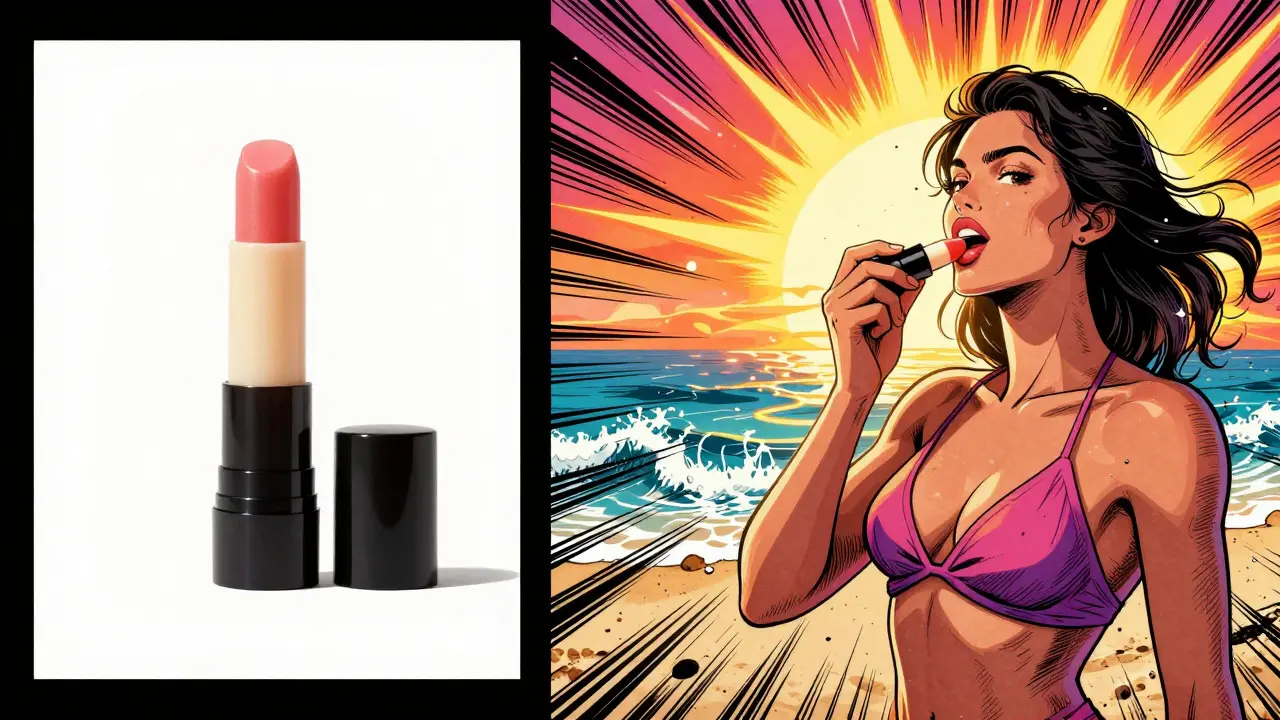
Imagine taking a flat, boring photo of a lip balm against a white background and instantly turning it into a sun-drenched shot of a model applying it on a beach. No photographer. No studio rental. No waiting weeks for post-production. This is the reality of multimodal generative AI in e-commerce today. It’s not just hype; it’s a working tool that changes how brands create content.
But here is the catch: if you upload a single, low-quality image, the AI will guess-and it might guess wrong. You could end up with distorted fabric, weird hands, or a product that looks nothing like what you sell. The technology is powerful, but it demands specific inputs to deliver professional results. Let’s break down how to use these tools effectively, where they fail, and how to build a workflow that actually boosts your conversion rates without breaking the bank.
What Is Multimodal Generative AI in E-Commerce?
Multimodal generative AI is a type of artificial intelligence that processes multiple types of data-like text, images, and video-to generate new, coherent content. In the context of online shopping, this means the system doesn’t just look at pixels. It understands the object (the product), the context (the scene), and the style (lighting, mood) simultaneously.
Traditional photo editing requires manual compositing. You cut out the product, find a background, adjust shadows, and match colors. With multimodal AI, you provide a base image and a prompt-or select from presets-and the model synthesizes a completely new image. Platforms like Instant or solutions from CreativeForce act as the interface, connecting you to powerful underlying models like Gemini 3 Pro or specialized variants like the NIA model. These engines have been trained on millions of lifestyle photos, allowing them to understand how light hits skin, how fabric drapes, and how a product should sit in a hand.
The key difference between this and older AI tools is the "multimodal" aspect. Older tools might generate an image from text alone. Multimodal systems take your actual product photo as a constraint. This ensures brand consistency because the core asset-the item you are selling-remains recognizable, even as the world around it changes.
Why Brands Are Switching to AI Lifestyle Shots
The primary driver is simple: cost and speed. Professional lifestyle photography is expensive. You need a location, a stylist, a makeup artist, a model, and a photographer. A single shoot can cost thousands of dollars and take days to plan. Then, there’s the time-to-content (TTC). By the time you edit and approve the shots, trends may have shifted.
AI compresses this timeline dramatically. A small marketing team can generate dozens of lifestyle variations in hours instead of weeks. According to industry analysis, this rapid creation capability allows smaller teams to compete with larger enterprises that have massive production budgets. You aren’t just saving money; you’re gaining agility. If a social media trend emerges on Tuesday, you can have relevant visuals live by Wednesday morning.
There is also the conversion factor. Research consistently shows that lifestyle imagery outperforms plain white-background product shots. People buy stories, not just objects. Seeing a sweater worn in a cozy, ombre-lit studio helps a customer visualize themselves wearing it. Seeing a skincare product applied in natural light builds trust in its efficacy. AI enables you to produce this high-converting content at scale.
How to Create High-Quality Lifestyle Images: Step-by-Step
You can’t just throw any photo into an AI generator and expect magic. The quality of your output depends entirely on the quality of your input. Here is the practical workflow used by successful e-commerce operators:
- Prepare Your Base Assets: Don’t use a blurry phone snapshot. Use clean, high-resolution product photos. Ideally, you should have front, back, side, and detail shots. The AI needs enough information to understand the product’s shape and texture.
- Choose Your Platform: Select a tool that integrates with your ecosystem. Platforms like Instant allow direct integration with Shopify stores, pulling your existing catalog automatically. Others require manual uploads. Choose based on your volume of products.
- Select or Create a Scene: Most platforms offer preset scenes (e.g., "beach," "urban street," "minimalist studio"). Start with these to test. For unique branding, you can often describe a custom scene using text prompts.
- Pick Your Model: Diversity matters. Platforms typically offer various demographic options-male and female models of different ages and ethnicities. Choose a model that resonates with your target audience. For example, selecting a model named "Astrid" might fit a beauty brand targeting young women.
- Refine with Prompts: Use specific language. Instead of "nice lighting," try "natural sunlight with soft shadows." Instead of "holding product," try "applying lip balm to lips with a grainy film effect." Specificity reduces hallucination errors.
- Generate and Iterate: Generate multiple variants. Use the "edit with AI" feature to keep the scene but change the model, or keep the model but change the background. This batch generation approach is crucial for building a full library of assets.

The Critical Limitation: Input Data Quality
This is where most people get tripped up. You might think AI replaces photography entirely. It doesn’t. It replaces *post-production* and *scene construction*, but it still needs good reference data.
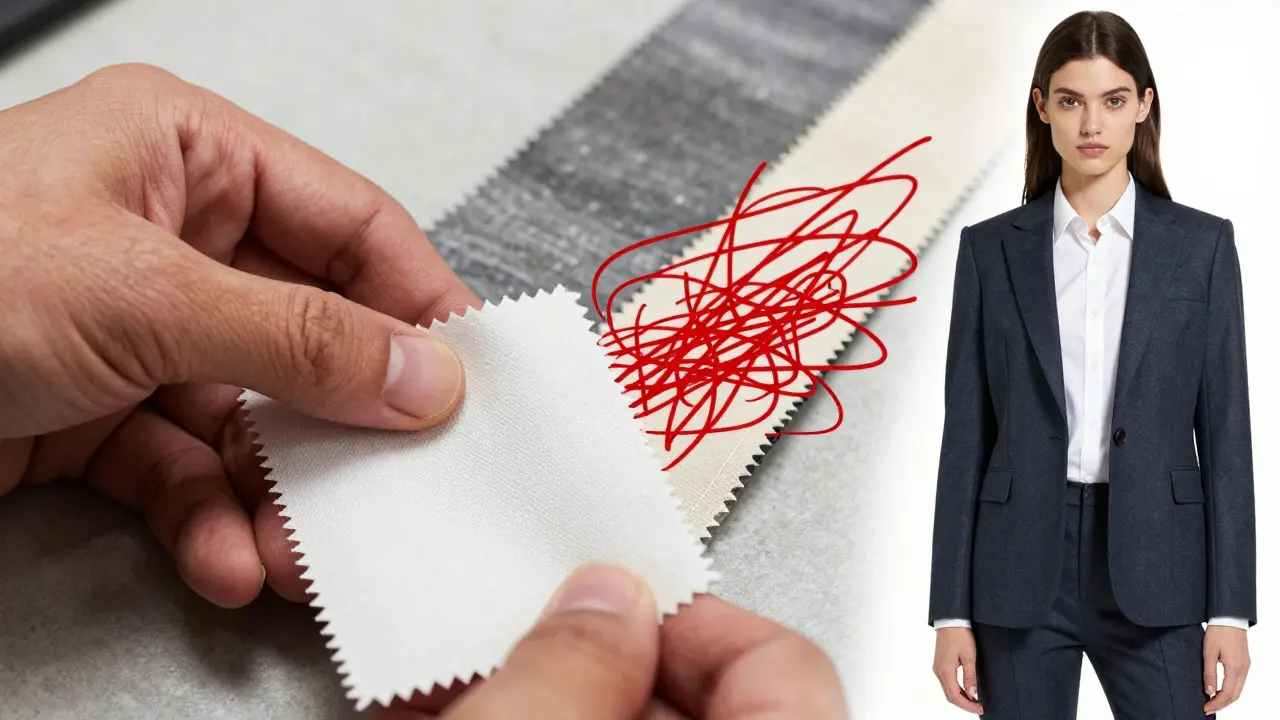
Testing by outlets like FStoppers has highlighted significant challenges with consistency and fabric accuracy. If you feed the AI a single front-facing photo of a complex garment, it has to guess what the back looks like. It often gets it wrong. Seams might disappear. Patterns might distort. The resolution can drop.
To get commercially viable results, you need to treat your input photography with professional standards. A standard e-commerce set includes front, side, and back views, plus a detail shot of the fabric texture. If you are selling clothing, include a swatch photo so the AI understands the weave. If you are selling electronics, ensure all ports and buttons are clearly visible in the base image.
Think of it this way: AI is a brilliant assistant, but it’s not psychic. Give it clear instructions and clear references, and it will deliver. Give it vague inputs, and it will make things up. And in e-commerce, making up details about your product is a recipe for returns and bad reviews.
Comparing Top AI Visual Tools
| Platform | Best For | Key Feature | Integration |
|---|---|---|---|
| Instant | Rapid social content | Shopify native integration | Direct API connection |
| Komar (Binary Republik) | Enterprise-scale transformation | Batch processing of raw images | Custom enterprise workflows |
| CreativeForce | Creative augmentation | Virtual mood boards | Plugin-based |
No single tool fits every business. If you run a large Shopify store with hundreds of SKUs, a platform like Instant that pulls directly from your catalog saves immense time. If you are a fashion brand needing precise control over fabric rendering, you might lean toward tools that allow more granular prompt engineering and higher-resolution outputs, accepting that you’ll need to spend more time on input preparation.
Practical Use Cases Beyond Basic Lifestyle Shots
Lifestyle contextualization is just the starting point. Here are other ways brands are leveraging this technology:
- Macro Beauty Applications: Instead of hiring a model for close-up shots, AI can generate hyper-realistic images of products being applied. Think lipstick on lips or serum on skin. This demonstrates usage without the logistical nightmare of macro photography.
- Background Swapping for Ads: Take your standard white-background product shot and place it in seasonal contexts. Snowy winter scenes for holiday sales, sunny beaches for summer promotions. This keeps your ad fresh without reshooting the product.
- Diverse Representation: Showcase the same product on models of different genders, ages, and body types. This isn’t just inclusive; it’s strategic. It helps more customers see themselves using your product, which broadens your market appeal.
- Virtual Mood Boards: Before committing to a physical shoot, generate AI concepts to test aesthetic directions. CreativeForce notes that these generated images act as dynamic mood boards, helping teams align on creative direction before spending budget on physical production.
Avoiding Common Pitfalls
Even with the best tools, mistakes happen. Here is how to avoid them:
- Ignoring Fabric Details: Always provide texture references. If the AI renders silk like cotton, your customers will be confused when the product arrives. Check the zoomed-in details of every AI-generated image.
- Over-Reliance on Auto-Prompts: Generic prompts yield generic results. Spend time crafting specific descriptions. Mention lighting conditions, camera angles, and emotional tone.
- Skipping Human Review: AI is fast, but it’s not perfect. Hands are notoriously difficult for AI to render correctly. Fingers might merge or multiply. Always have a human eye review the final output before publishing.
- Neglecting Brand Guidelines: Ensure the color grading and style of the AI images match your brand identity. Consistency builds trust. If your brand is minimalist, don’t let the AI add cluttered backgrounds.
The Future of Visual Commerce
We are in a transitional phase. The technology is not flawless yet, as noted by experts who describe current outputs as "adequate" rather than perfect. However, the trajectory is clear. Models are getting smarter, faster, and more accurate. Integration with e-commerce infrastructure is becoming seamless.
In the near future, we will likely see real-time customization. Imagine a customer uploading their own photo and seeing how a pair of sunglasses looks on their face instantly, powered by multimodal AI. Or dynamic ads that change their background based on the viewer’s local weather.
For now, the smartest approach is hybrid. Use professional photography for your core product assets-the clean, detailed shots that serve as the truth. Then, use multimodal generative AI to explode those assets into hundreds of lifestyle variations. This combines the reliability of traditional methods with the scalability of AI.
Start small. Pick one product line. Test different platforms. Measure your conversion rates. You’ll likely find that the ROI speaks for itself. The brands that master this balance of human curation and AI automation will lead the next wave of digital commerce.
Do I need professional photos to use AI for e-commerce visuals?
Yes, high-quality base images are crucial. While AI can enhance images, it struggles with poor inputs. For best results, provide clear, high-resolution photos from multiple angles (front, back, side) and include texture details. A single low-quality photo often leads to inaccurate fabric rendering or distorted shapes.
Can AI replace professional photographers entirely?
Not yet. AI is excellent for generating lifestyle contexts and variations, but it currently lacks the precision needed for initial product capture, especially for complex items like clothing. The most effective workflow is hybrid: use professional photography for base assets and AI for lifestyle expansion and background generation.
Which AI model is best for e-commerce?
It depends on your needs. Models like Gemini 3 Pro are often cited for overall quality, while specialized platforms like Instant or Komar offer tailored interfaces for e-commerce workflows. Look for platforms that support multiple underlying models, allowing you to switch between them based on the specific product type (e.g., fashion vs. electronics).
How does multimodal AI improve conversion rates?
Lifestyle imagery helps customers visualize products in their own lives, which increases purchase intent. AI allows you to create diverse, high-quality lifestyle shots at scale, ensuring your ads and product pages always feature engaging, contextual visuals rather than static white-background images.
Is AI-generated content allowed on major e-commerce platforms?
Yes, platforms like Amazon and Shopify generally allow AI-generated images, provided they accurately represent the product. Misleading images (where the product looks significantly different from reality) can lead to returns or account penalties. Always ensure the AI output matches the physical product’s details.


Art HND
July 26, 2026 AT 20:11It is all just marketing fluff designed to sell subscriptions. The tech is not ready for prime time.
Elizabeth Brooks
July 27, 2026 AT 13:48i totally get the hype but ive tried a few tools and the hands are still kinda weird sometimes lol. you really do need good base photos though or it looks like a nightmare. i used instant for my small shop and it saved me so much money on shoots. just make sure you check the fabric details before posting!
Brandon Olvera
July 27, 2026 AT 20:58Another day another american innovation being sold back to us at a premium while our local photographers go out of business. Keep your jobs safe people. Do not let the machines take over the creative process entirely. It is about preserving our cultural heritage of real art.
Deb Kortyna, MBA
July 27, 2026 AT 22:45One must consider the long-term implications of relying on synthetic media for brand identity. While the cost savings are undeniable, the potential for brand dilution is significant if the output lacks consistency. A rigorous quality assurance protocol is essential to maintain consumer trust in an increasingly saturated digital marketplace.
alex kobri
July 29, 2026 AT 13:45the question is not whether we use it but how we define authenticity now. if the image sells the product does the origin matter. i think we are moving towards a post-photography era where the idea is more important than the capture. interesting times ahead
Zach Loescher
July 30, 2026 AT 12:31I have been testing this for my own store and it is quite fascinating. The speed is impressive but you need to be careful with the prompts. I found that describing the lighting specifically helps a lot. It feels like a new skill set for marketers to learn.